
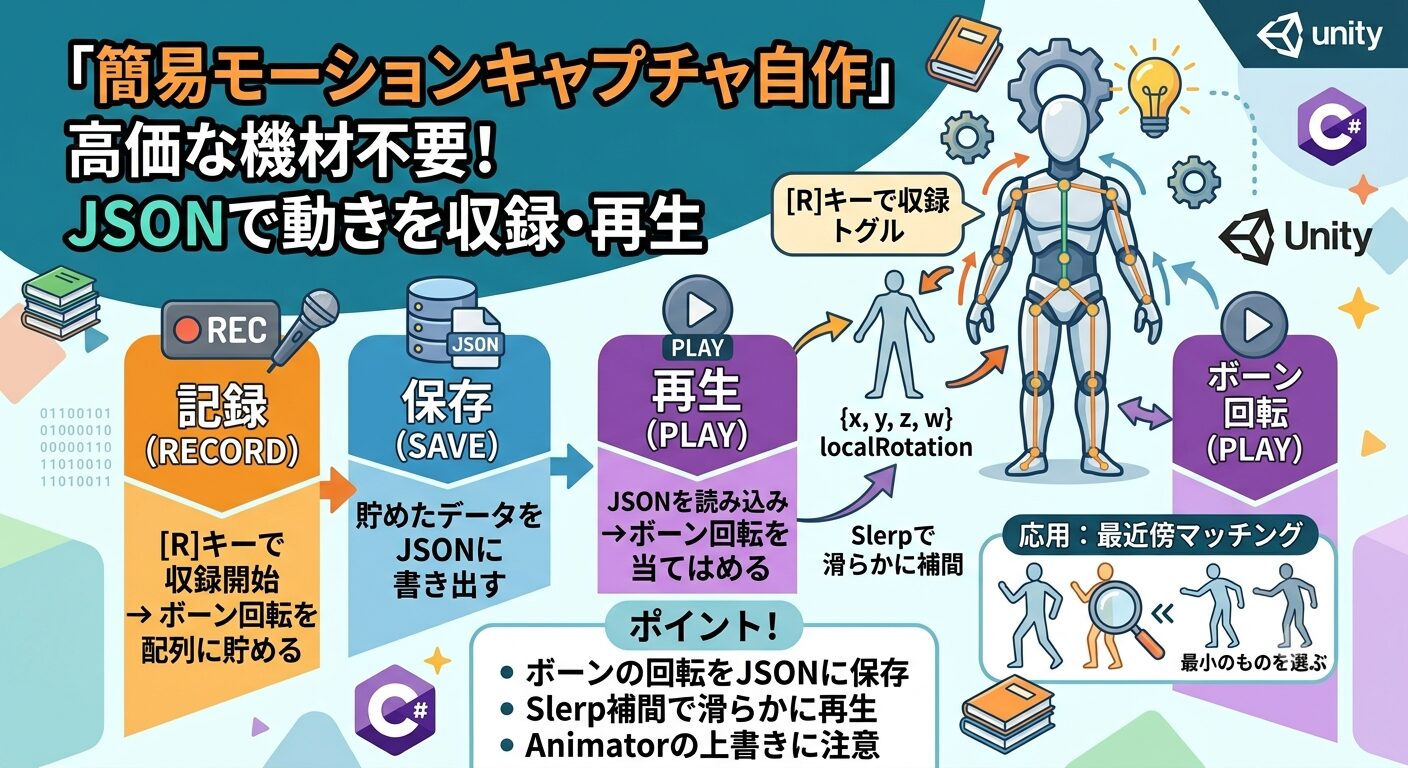
これまでのヒューマノイドシリーズ(①移動・②IK・③手続き的歩行)では、用意したアニメや計算で動かしてきました。今回 は逆に、キャラクターの動きを「収録」して、後から再生する簡易モーションキャプチャを自作します。高価な 機材は不要で、ボーンの回転をJSONに保存するだけ。さらに、収録した動きを使った”最近傍マッチング”まで触れます。
何を作るのか
市販のモーキャプは専用スーツやカメラで体の位置を記録しますが、今回作るのはもっとシンプルな仕組みです。
- 記録:毎フレーム、各ボーンの回転(localRotation)を配列に貯める
- 保存:貯めたデータをJSONファイルに書き出す
- 再生:JSONを読み込み、フレーム順にボーン回転を当てはめる
つまり「ボーンの回転の時系列」を記録・再生するだけ。これだけで、アニメ実行中の動きや手動で動かしたポーズの連続を”自 分のモーションクリップ”として残せます。言語はUnity標準のC#です(言語選びに迷っている人は別記事も参考に)。
1. データ構造を定義する
UnityのJsonUtilityでシリアライズできるよう、[System.Serializable]を付けたクラスで「1フレーム分」と「ク
リップ全体」を表します。QuaternionはそのままだとJSON化しにくいので、x/y/z/wに分解して保持します。
using System.Collections.Generic;
  using UnityEngine;

  [System.Serializable]
  public class BoneRot
  {
      public float x, y, z, w;
      public BoneRot(Quaternion q) { x=q.x; y=q.y; z=q.z; w=q.w; }
      public Quaternion ToQuaternion() => new Quaternion(x, y, z, w);
  }

  [System.Serializable]
  public class MotionFrame
  {
      public float time;              // 収録開始からの経過秒
      public List<BoneRot> rotations; // ボーン順の回転
  }

  [System.Serializable]
  public class MotionClip
  {
      public List<string> boneNames;  // どのボーンを記録したか
      public List<MotionFrame> frames; // フレーム列
  }
2. MotionRecorder:Rキーで収録してJSON保存
記録対象のボーンを集め、収録中は毎フレーム回転を追加します。停止したらJSON化して保存します。入力は新しいInput
SystemのKeyboard.currentを使います。
using System.Collections.Generic;
  using System.IO;
  using UnityEngine;
  using UnityEngine.InputSystem;

  public class MotionRecorder : MonoBehaviour
  {
      [SerializeField] Animator animator;
      Transform[] _bones;
      MotionClip _clip;
      bool _recording;
      float _startTime;

      void Start()
      {
          // 記録するボーンを集める(ここでは全Humanoidボーン)
          var list = new List<Transform>();
          foreach (HumanBodyBones b in System.Enum.GetValues(typeof(HumanBodyBones)))
          {
              if (b == HumanBodyBones.LastBone) continue;
              var t = animator.GetBoneTransform(b);
              if (t != null) list.Add(t);
          }
          _bones = list.ToArray();
      }

      void Update()
      {
          var kb = Keyboard.current;
          if (kb == null) return;

          if (kb.rKey.wasPressedThisFrame)  // Rで収録トグル
          {
              if (!_recording) BeginRecord();
              else SaveRecord();
          }

          if (_recording) CaptureFrame();
      }

      void BeginRecord()
      {
          _recording = true;
          _startTime = Time.time;
          _clip = new MotionClip { boneNames = new List<string>(), frames = new List<MotionFrame>() };
          foreach (var b in _bones) _clip.boneNames.Add(b.name);
          Debug.Log("収録開始");
      }

      void CaptureFrame()
      {
          var frame = new MotionFrame { time = Time.time - _startTime, rotations = new List<BoneRot>() };
          foreach (var b in _bones) frame.rotations.Add(new BoneRot(b.localRotation));
          _clip.frames.Add(frame);
      }

      void SaveRecord()
      {
          _recording = false;
          string json = JsonUtility.ToJson(_clip);
          string path = Path.Combine(Application.persistentDataPath, "motion.json");
          File.WriteAllText(path, json);
          Debug.Log($"保存しました: {path}({_clip.frames.Count}フレーム)");
      }
}ポイントはワールド回転(rotation)ではなくlocalRotationを記録すること。親子関係に沿った相対回転なの で、再生時に位置がずれず、別の場所でも同じポーズを再現できます。
3. MotionPlayer:Pキーで再生する
保存したJSONを読み込み、経過時間に対応するフレームのボーン回転を当てはめます。隣り合うフレームをSlerp
で補間すると、カクつかず滑らかになります。
using System.IO;
  using UnityEngine;
  using UnityEngine.InputSystem;

  public class MotionPlayer : MonoBehaviour
  {
      [SerializeField] Animator animator;
      MotionClip _clip;
      Transform[] _bones;
      bool _playing;
      float _playTime;

      void Update()
      {
          var kb = Keyboard.current;
          if (kb != null && kb.pKey.wasPressedThisFrame) Load();

          if (_playing) Step();
      }

      void Load()
      {
          string path = Path.Combine(Application.persistentDataPath, "motion.json");
          if (!File.Exists(path)) { Debug.LogWarning("motion.json が無い"); return; }

          _clip = JsonUtility.FromJson<MotionClip>(File.ReadAllText(path));
          _bones = new Transform[_clip.boneNames.Count];
          for (int i = 0; i < _clip.boneNames.Count; i++)
              _bones[i] = FindBone(_clip.boneNames[i]);

          _playTime = 0f;
          _playing = true;
      }

      void Step()
      {
          _playTime += Time.deltaTime;

          // 経過時間を挟む2フレームを探す
          var frames = _clip.frames;
          if (_playTime >= frames[frames.Count - 1].time) { _playing = false; return; }

          int i = 0;
          while (i < frames.Count - 1 && frames[i + 1].time < _playTime) i++;

          var a = frames[i];
          var b = frames[i + 1];
          float t = Mathf.InverseLerp(a.time, b.time, _playTime);

          for (int j = 0; j < _bones.Length; j++)
          {
              if (_bones[j] == null) continue;
              Quaternion qa = a.rotations[j].ToQuaternion();
              Quaternion qb = b.rotations[j].ToQuaternion();
              _bones[j].localRotation = Quaternion.Slerp(qa, qb, t);
          }
      }

      Transform FindBone(string name)
      {
          foreach (var t in animator.GetComponentsInChildren<Transform>())
              if (t.name == name) return t;
          return null;
      }
  }
⚠️ 注意:再生中はAnimatorが回転を上書きしないよう、AnimatorのControllerを外すか、ボーン適用をLateUpdateで行ってください( このシリーズ①で解説した「Updateで動かしてもAnimatorが後から上書きする」問題と同じです)。
4. 応用:最近傍マッチングで「似た動き」を探す
収録データが溜まると、「今のポーズに一番近いフレーム」を探す、ごく簡単なモーション学習に発展できます。各フレームの 全ボーン回転の差を合計し、最小のものを選ぶ”最近傍探索”です。
// 現在の姿勢に最も近いフレーム番号を返す
  int FindNearest(Quaternion[] current, MotionClip clip)
  {
      int best = -1;
      float bestCost = float.MaxValue;
      for (int f = 0; f < clip.frames.Count; f++)
      {
          float cost = 0f;
          var rots = clip.frames[f].rotations;
          for (int j = 0; j < current.Length; j++)
              cost += Quaternion.Angle(current[j], rots[j].ToQuaternion());
          if (cost < bestCost) { bestCost = cost; best = f; }
      }
      return best;
}Quaternion.Angleで2つの回転の差を角度で測り、合計コストが最小のフレームを採用します。これだけでも「似
た姿勢の続きを再生する」といった簡単なモーション合成の土台になります。
よくあるハマりどころ
| 症状 | 原因 |
|---|---|
| 再生しても動か ない | Animatorが毎フレーム上書きしている(Controllerを外す/LateUpdate適用) |
| ポーズが崩れる | rotation(ワールド)を記録した。localRotationにする |
| JSONが空・読めない | 保存先はApplicati on.persistentDataPath。パスをログで確認 |
| 再生がカクつく | フレーム間をSlerpで補間する | ボーンが対応しない | 記録時と再生時でボーン名が一致しているか確認 |
まとめ
- モーキャプの正体は「ボーン回転の時系列の記録・再生」
- 記録はlocalRotationで。JSON化はx/y/z/wに分解
- 再生はフレーム間をSlerp補間して滑らかに
- Animatorの上書きに注意(Controllerを外す/LateUpdate)
- 応用:最近傍マッチングで簡単なモーション学習に発展できる
専用機材がなくても、Unityとコードだけで動きの収録・再生は実現できます。シリーズ①〜③の歩行・IK・手続き的アニメと組み 合わせれば、自作の動きをキャラに持たせる表現の幅が一気に広がります。まずはRキーで数秒の動きを収録し、Pキーで再生すると ころから試してみてください。